
The all‑in‑one AI audio cleaner for Mac.
Remove background noise, filler words and echo, or clean your audio by editing its transcript. Everything runs on your Mac. Nothing is uploaded.
See Aulio Studio in 30 seconds
Loved by podcasters, journalists, audio engineers and creators who want clean audio without learning a DAW.
Noisy background removed
Removed street noise

#1 AI Audio Clean Mac App for Creators, Engineers & Professionals
Aulio Studio vs Hush and every other tool
Hush ($99) only removes noise. Aulio Studio is a complete studio flow: preview live, clean, cut fillers, add effects, export clips from transcript. No uploads, all on-device.
| Feature | Aulio Studio | Hush | Cleanvoice | Adobe Podcast | Descript |
|---|---|---|---|---|---|
| Files stay on your Mac | ✓ | ✓ | ✗ | ✗ | ✗ |
| Noise removal | ✓ | ✓ | ✓ | ✓ | ✓ |
| Filler words & stutters | ✓ | ✗ | ✓ | ✓ fillers only | ✓ fillers only |
| Transcription | ✓ | ✗ | ✓ | ✓ | ✓ |
| Reverb / echo / EQ effects | ✓ | ✗ | ✗ | ✗ | ✗ |
| Batch processing | ✓ | ✗ | ✓ | ✓ Premium | ✗ |
| Price | From $49 one-time | $99 one-time | ~$9/mo | $9.99/mo | $24/mo |
vs Hush
- Filler word removal (um, uh)
- Stutter removal
- 100% on-device, no uploads
- Apply reverb / echo / EQ on audio
- From $49 one-time vs Hush $99
vs Cleanvoice / Adobe Podcast
- 100% on-device, nothing leaves your Mac
- Apply reverb / echo / EQ on audio
- Buy once, no required subscription
- Job history saved locally
vs Descript
- 100% on-device, your audio never leaves your Mac
- Stutter removal + batch processing
- Buy once, no required subscription
- Apply reverb / echo / EQ on audio
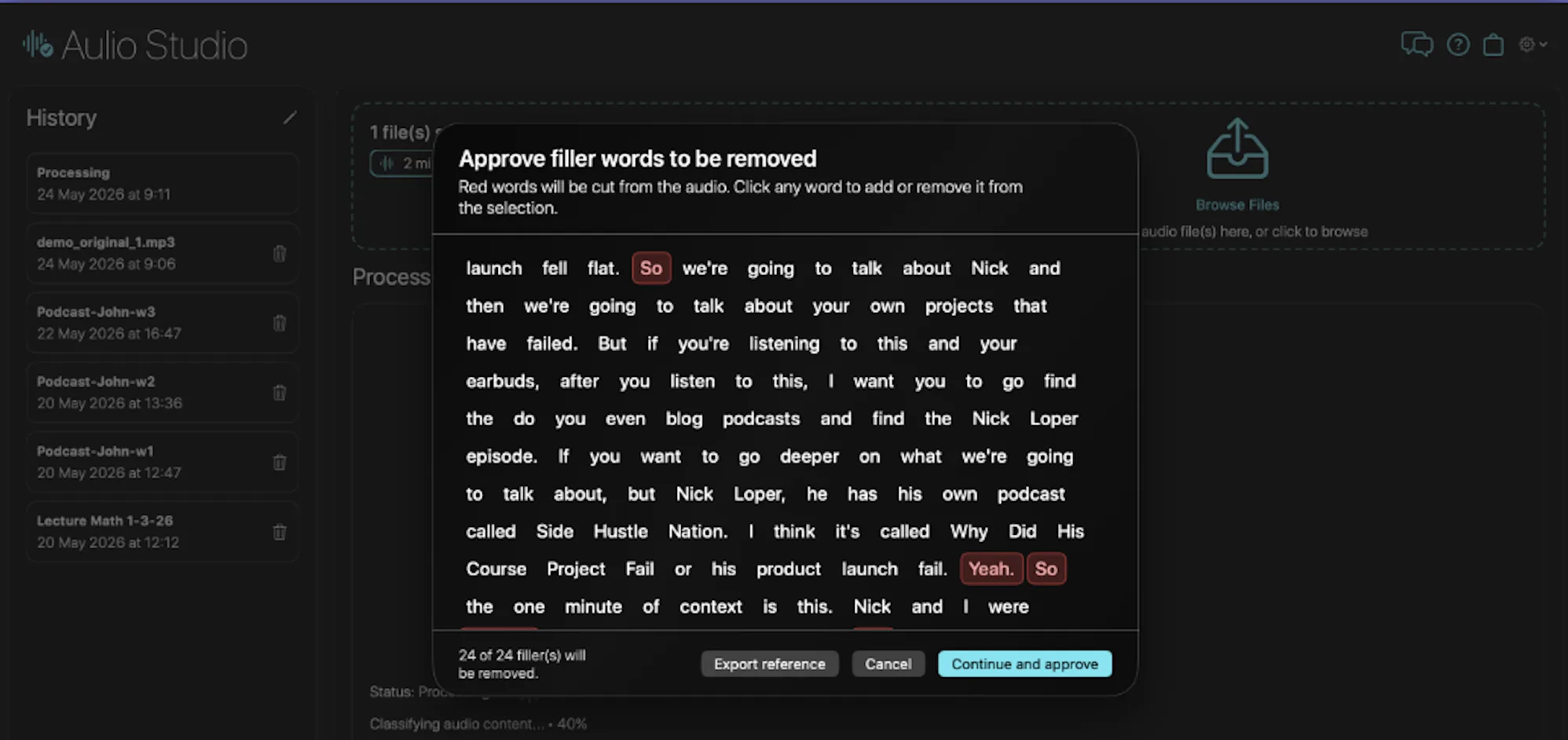
Total Cut Control
We highlight the filler words; you make the final call. Edit and approve your transcript draft before we remove anything from your audio.
The full studio flow
Every step from raw recording to final clip, without leaving your Mac.
1 · Clean it
- Remove background noise, hiss, and hum, plus transient sounds like birds, dogs, and horns
- Reduce room echo and reverb from untreated spaces
- Cut filler words (um, uh, like), stutters, and long silences automatically
- Live A/B preview before you commit, with an adjustable noise-reduction strength dial
2 · Shape and transcribe
- Effects: reverb, echo, warmth, and loudness targets for podcast, streaming, broadcast, and studio
- Sound style profiles: Voice Clarity, Warm, Neutral, Broadcast
- Transcribe in 99 languages and export the transcript as TXT, PDF, or DOC
- Select any text in the transcript to export that exact moment as a clip, no timeline needed
3 · Export and batch
- Export MP3, WAV, FLAC, M4A, or AIFF, and process audio straight from MP4 and MOV video
- Batch multiple files with shared settings, and revisit any job from history
- 100% on-device on the Apple Silicon Neural Engine; nothing uploads, works offline
4 · Logic Pro plugins, real-time AUv3 (Pro)
Aulio Studio Pro ships two native AUv3 plugins that load right on a track in Logic Pro and GarageBand and clean audio in real time as it plays. They install with the app straight from the Mac App Store, with no separate installer and no system extension, fully sandboxed. No other AI noise tool ships a real-time AUv3 plugin for Logic Pro.
- Aulio Clear: the same AI noise removal as the app, running live on a Logic Pro track insert. Broadband noise, hiss, hum, and background sounds gone while you mix, with an adjustable strength dial.
- Aulio Roomtone: strips the speech and isolates the background noise floor, so you can capture seamless room-tone loops to fill gaps and smooth edits.
- Real-time on the insert chain: automate, A/B, and bounce inside your session, with no offline file-export round-trip.
- Native Apple Silicon, 100% on-device: nothing uploads, no account, works offline.
- Included in Aulio Studio Pro ($99), or add to the $49 app as the Plugin Bundle ($59), or individually (Aulio Clear $39, Aulio Roomtone $29).
Raw recording to polished clip in minutes
Drop your file
Drag in any audio or video file. Nothing is uploaded. Everything stays on your Mac.
Preview and tune live
Hear the result before committing. Adjust noise reduction, effects, and loudness in real time.
Clean, cut, polish
Remove noise, fillers, and stutters. Add reverb, echo, or warmth. Done in under a minute on Apple Silicon.
Export any clip
Select text in the transcript to export exactly that audio as a standalone clip. Or export the full file as MP3, WAV, FLAC, or M4A.
Simple, honest pricing
Every plan includes all cleanup features, transcription and batch processing. Free 10-day trial.
The full app + Logic Pro plugins. Yours forever.
Start free trialAlready own Aulio Studio? Add the Logic Pro plugins for $59.
Your files never leave your Mac
Aulio Studio runs the entire studio flow on your Mac: noise reduction, filler detection, transcription, effects, and clip export. 100% on-device AI. No audio is ever uploaded to any server. Your recordings and transcripts stay exclusively on your device. See our Privacy Policy.
What our users say
"Recording a weekly podcast from my home office means fighting my AC, street noise and a neighbor who mows his lawn at the worst possible times. Spent months trying to fix it, Audacity noise gates, Descript also, even paid plugins: nothing felt right, something always got mangled. Aulio Studio cleaned up my worst recordings in seconds and my voice still sounds like me. Listeners started DMing me asking if I upgraded my mic. I didn't. Just switched to Aulio Studio."
"Very simple and straightforward interface. The process is simple and quick and the result is clean as promised. Big like!"
"Honestly, this app has saved me a lot of time and effort when preparing audio materials for lessons. I work in education and often need clear recordings for my students, but background noise was always an issue. With this app, the sound quality is much cleaner, and I can use recordings directly without complicated editing. Even without technical experience, I was able to improve audio quality within minutes. I highly recommend it to any teacher or student who needs clear and professional recordings."
"I occasionally make videos for YouTube, and I was looking for a way to improve audio on Mac without any cloud stuff. With Aulio I can edit multiple video files and still adjust the level of noise suppression. In the end, the app exports the video with the new audio in it. Very practical for my workflow. And the developer usually replies within 10 minutes if you have questions or ideas for improvement. You really can't ask for more!"
Frequently asked questions
Is Aulio Studio free for Mac?
You get a free 10-day trial with full access. Then pick a plan in the app: $49 one-time, $99 one-time with the Logic Pro plugins, or $9.99/month. No per-minute credits.
Is my audio kept private?
Yes. Everything is processed 100% on your Mac. Your audio and transcripts are never uploaded.
How is Aulio Studio different from Hush, Adobe Podcast, Descript, Cleanvoice or Auphonic?
Hush only removes noise. Adobe Podcast, Descript, Cleanvoice and Auphonic upload your files to the cloud and charge monthly. Aulio Studio removes noise, filler words, stutters and long silences, adds live effects and transcription, and runs entirely on your Mac, with a one-time price option.
How do I remove um and uh from audio on Mac?
Open your recording in Aulio Studio and turn on filler word detection. Every um, uh and like is highlighted, you approve what gets cut, then export as MP3, WAV or M4A.
How do I remove background noise from a video on Mac?
Drop your MP4 or MOV file into Aulio Studio. The AI separates your voice from the noise, and you export clean audio or keep it as a video.
Does Aulio Studio transcribe audio?
Yes, in 99 languages. Export the transcript as TXT, PDF or DOC, or select text to export just that clip.
What formats does it support?
It opens common audio and video files (MP3, WAV, FLAC, M4A, MP4, MOV) and exports M4A, WAV, AIFF, FLAC or MP3 at up to 192 kHz.
How do the Logic Pro plugins work?
Aulio Clear (real-time noise removal) and Aulio Roomtone (room-tone capture) are AUv3 plugins for Logic Pro, GarageBand and other AUv3 hosts. They come with Aulio Studio Pro and the monthly plan, or as add-ons.
What do I need to run it?
A Mac with macOS 14 or later. It is Mac-only for now.
AI audio cleanup, 100% on-device, engineered for macOS
10-day free trial · from $49 one-time · or $9.99/mo
Download on the Mac App Store